Airflow is a scheduler and orchestrator, not a processing engine. The DAGs that cause the fewest incidents keep the heavy lifting in the warehouse and use Airflow to decide what runs, when, and in what order.
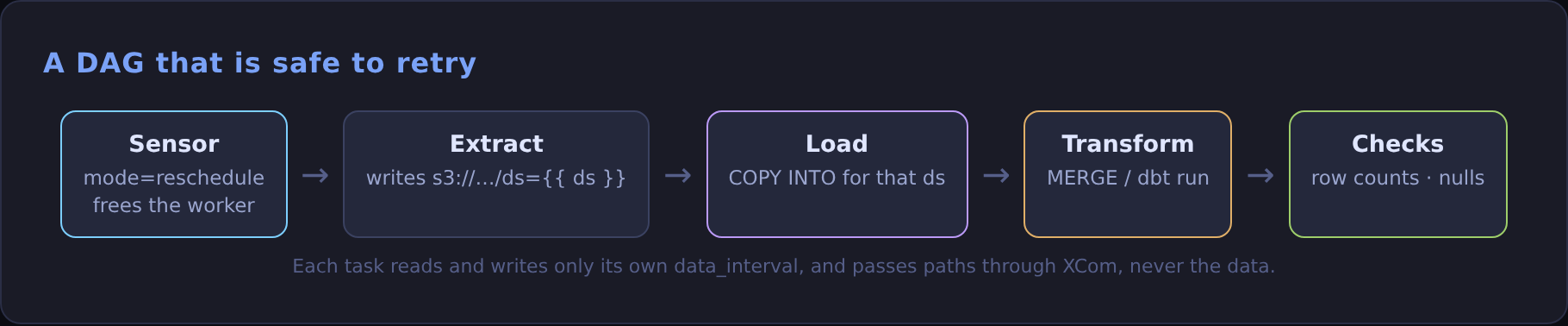
1. Keep top-level code cheap
The scheduler re-parses every DAG file every few seconds. Anything at module level runs on every parse:
Slow parsing is the most common reason a scheduler "feels stuck".
2. One task, one job, safe to retry
Each task should do one thing and be idempotent (same window in, same result out), so retries are harmless:
3. Use the run's window, never now()
Every DAG run has a data_interval_start and data_interval_end. Use them, and reruns and backfills just work. datetime.now() inside a task means a rerun on Tuesday processes Tuesday, not the Monday it was meant for.
4. Decide on catchup on purpose
catchup=True with an old start_date schedules every missed interval the moment you unpause. Leave it False unless you actually want a backfill, and run backfills deliberately.
5. Pass references, not data
XCom is for small values: a file path, a row count, a table name. Don't push DataFrames through it. Write to object storage or a staging table and pass the location.
6. Make waiting cheap
Sensors that poke in mode="poke" hold a worker slot the whole time. Use mode="reschedule", or a deferrable sensor, so waiting costs nothing.
7. Let the warehouse do the work
Pulling a million rows into a Python task to transform them is slower and more fragile than one SQL statement. Trigger the transform (a stored procedure, a dbt build, a MERGE) and let Snowflake run it.
A pre-merge checklist
- No database or API calls at module level.
catchup,retries, andmax_active_runsset explicitly.- Every task uses the data interval, not wall-clock time.
- Only small values in XCom.
- Alerts (
on_failure_callbackor email) wired to someone who will read them.
Try it: lint your DAGs before they hit the scheduler
Two commands catch most of the problems above before they reach production:
If the first command takes more than a second or two, something at the top of the file is calling a database or an API. Move it inside a task.