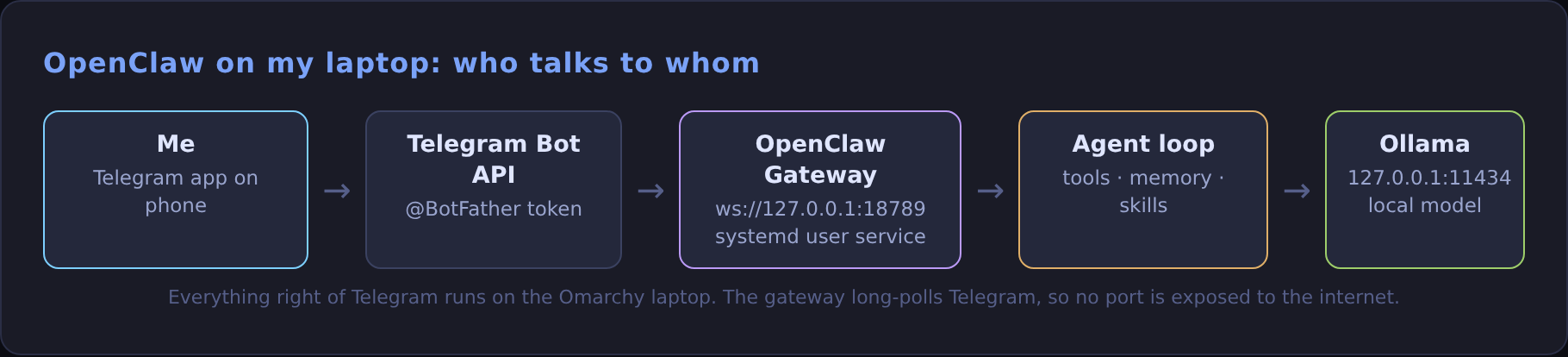
I message a Telegram bot from my phone, and an agent running on my Omarchy laptop answers, using a model served locally by Ollama. No cloud model, no open ports, and the agent can use tools on the machine I gave it.
The piece in the middle is OpenClaw, an open-source assistant that connects chat apps to AI agents through a local gateway. Here's the exact setup, with real terminal output from each step.
What you need
- Ollama running with a model that supports tool calling (
ollama show <model>liststoolsunder capabilities). - Node 24.16+ (OpenClaw won't install on Node 22). On Omarchy:
mise use -g node@24. - A Telegram account.
1. Install OpenClaw
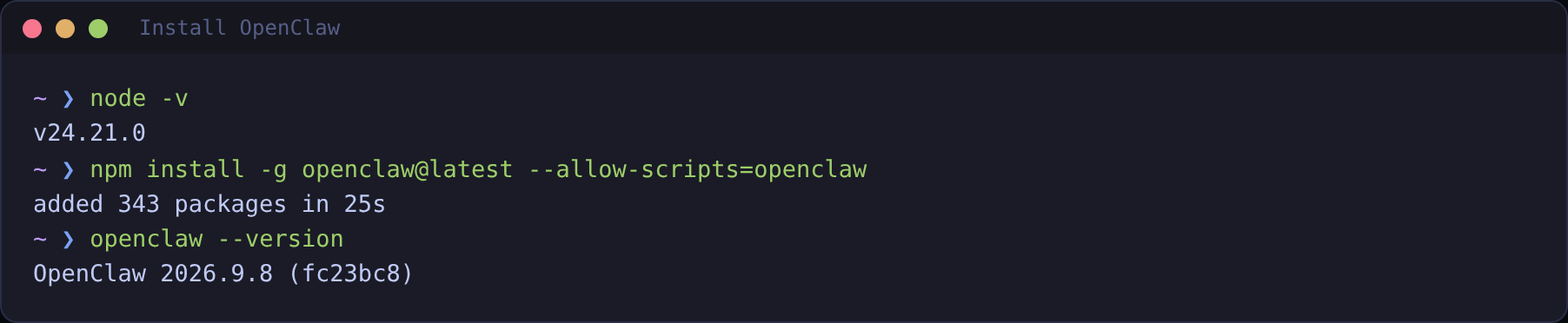
--allow-scripts=openclaw lets its install scripts run.There's also a one-line installer (curl -fsSL https://openclaw.ai/install.sh | bash) and, if Ollama is already set up, ollama launch openclaw does the install, model pick and onboarding in one go.
2. Onboard it with Ollama as the model
The wizard asks for a model provider (choose Ollama), detects your local models, writes ~/.openclaw/openclaw.json, and installs the gateway as a systemd user service so it starts on login. The scriptable version of the same thing:
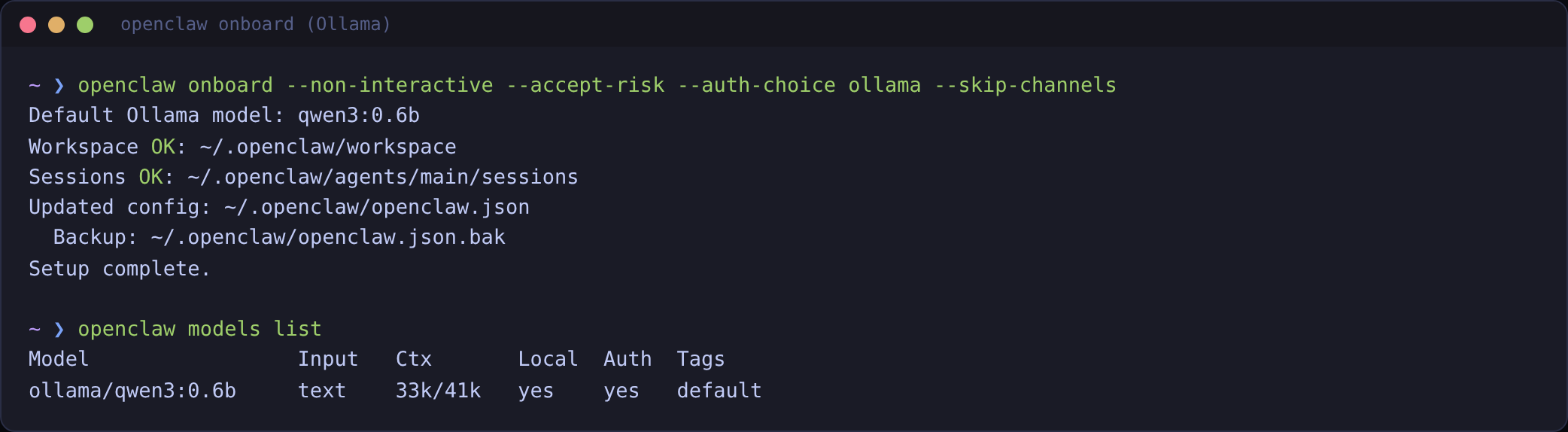
The relevant part of the config it writes:
Keep bind on loopback. The gateway can run tools on your machine, so only local clients should reach it.
3. Check the gateway is up
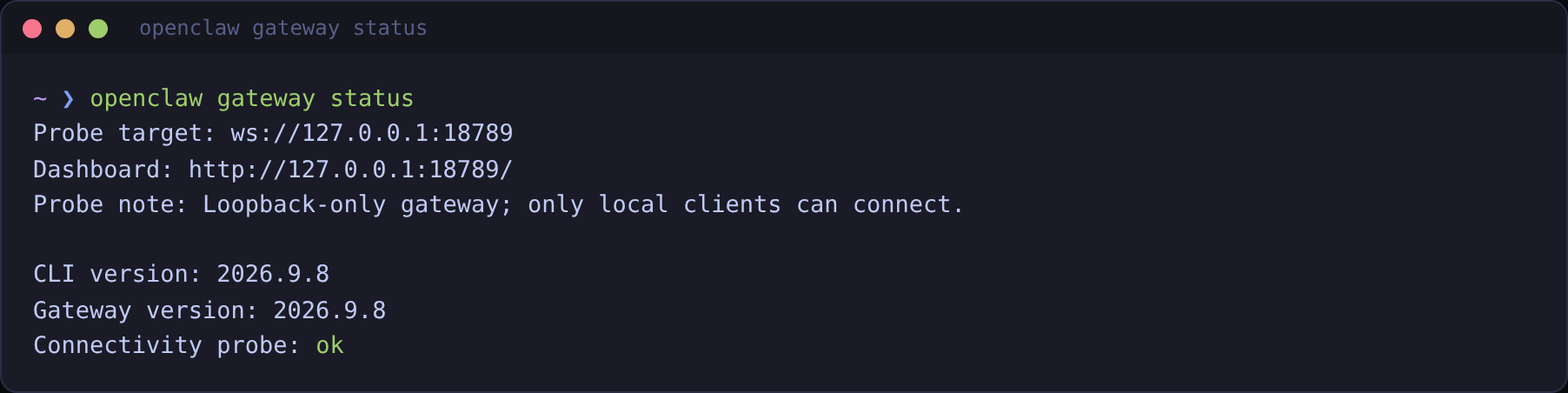
http://127.0.0.1:18789/.4. Create the Telegram bot
- In Telegram, open a chat with @BotFather (check the handle exactly).
- Send
/newbot, pick a display name and a username ending inbot. - Copy the token it gives you. Treat it like a password.
5. Connect the bot to OpenClaw
Or put it in ~/.openclaw/openclaw.json yourself:
The running gateway hot-reloads the change. dmPolicy: "pairing" is the important line: strangers who find your bot can't talk to your agent until you approve them.
6. Pair your own account
Send your bot any message from your phone. That creates a pairing request. Approve it on the laptop:
Codes expire after an hour. Once approved, every message you send the bot goes to the agent, and its reply comes back in the chat.
7. Make the local model good enough
This is where most local setups fall over:
- Context window. OpenClaw's system prompt, tools and memory need room. Ollama's docs recommend at least 64k tokens for local models. Set
OLLAMA_CONTEXT_LENGTH=65536on the Ollama service (how). - But context costs RAM. On an 8 GB test box, a 32k context got the model killed mid-load, and the agent just reported
provider internal error, HTTP 500. If you see that, checkjournalctl -u ollamafor a killed runner and lower the context or use a smaller model. - Model size. Tiny models can call tools but make poor decisions. Use the biggest tool-capable model your GPU runs comfortably, and keep a small one for quick tests.
- Keep it warm.
OLLAMA_KEEP_ALIVE=30mstops the first message after a break from waiting for a model load.
8. Day-to-day commands
| Command | Use |
|---|---|
openclaw status | Health, sessions, channels at a glance |
openclaw logs --follow | Watch messages and tool calls live |
openclaw models list | Which model the agent uses |
openclaw doctor | Find and fix config problems |
openclaw gateway stop | Stop the gateway |
openclaw security audit | Check what the agent is allowed to do |
Guardrails I'd keep
- Pairing on, and only your Telegram user ID allowed.
- Gateway on loopback, no port forwarding.
- Run
openclaw security auditafter changing tools or skills, and keep risky tools behind approvals. - Keep the bot token and gateway token out of screenshots and git. None of the ones here show either.
The agent loop running behind all this is the one from my AI agents guide, just with a phone on the other end.