A data pipeline without tests breaks quietly. An LLM feature without evaluations breaks quietly and changes behaviour whenever someone edits a prompt or the provider ships a new model version. The fix is the same discipline data engineers already use: a fixed dataset, automated checks and a number you watch.

1. Build a golden dataset
Collect 50–200 real inputs: actual user questions, real documents, messy edge cases. For each, write down what a good output looks like. That could be an exact label, a required fact, or a short rubric. Version it in git next to the prompts.
Start small. Thirty well-chosen examples beat none.
2. Use the cheapest check that works
In order of preference:
- Deterministic checks. Valid JSON? Matches the schema? Contains the required field? Correct label? These are fast, free and unambiguous.
- Reference comparisons. Does the extracted amount equal the labelled amount? Did retrieval return the labelled document?
- LLM-as-judge. A second model grades the output against a rubric ("Is every claim supported by the sources? yes/no, and why"). Useful for open-ended text, but spot-check the judge against human ratings before you trust it.
3. Score the parts separately
For a RAG app, a single "quality" number hides the cause. Track retrieval (did the right chunk come back?), faithfulness (does the answer stick to the sources?) and answer quality on their own. For an agent, track task success, steps and cost per task.
4. Run evals like CI
Every prompt edit, model upgrade or retrieval change runs the suite. A drop in any metric beyond a small tolerance blocks the change, just as a failing dbt test blocks a deploy.
5. Keep watching in production
- Log inputs, outputs, latency, token cost and the model version for every call.
- Sample production traffic for review each week and add interesting failures to the golden set.
- Collect cheap user signals such as thumbs up or down, and whether the user retried or edited the answer.
6. Don't forget cost and latency
Quality is one axis. A change that improves accuracy by two points but doubles latency or cost per request is a trade-off, not a win. Put all three on the same dashboard.
The teams that ship reliable GenAI features aren't the ones with the cleverest prompts. They're the ones that can tell, within minutes, whether a change made things better or worse.
Try it: a five-question eval that fails
Here's a tiny golden set with cheap graders (substring, exact match, regex) run against a 1.7B local model:
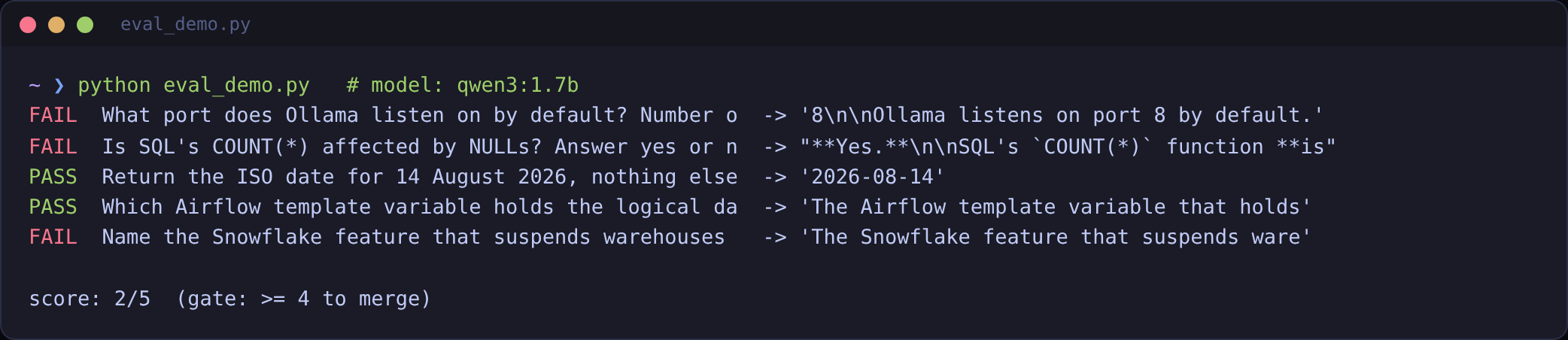
This is the eval working, not breaking. It caught a model inventing a port number, contradicting a basic SQL fact, and running past the length budget. Swap in a bigger model or a better prompt, rerun, and you have a number to compare instead of a feeling.